How to Access Previous Engagement Cycle Data

Accessing your prior engagement data in ECIP LAB is quick and straightforward, giving you a clear view of your progress over time. By navigating to your Company information and reviewing the Campaign History section, you can revisit past engagement cycles, explore detailed responses, and better understand your performance across key areas. Watch the full demo or follow the steps below.
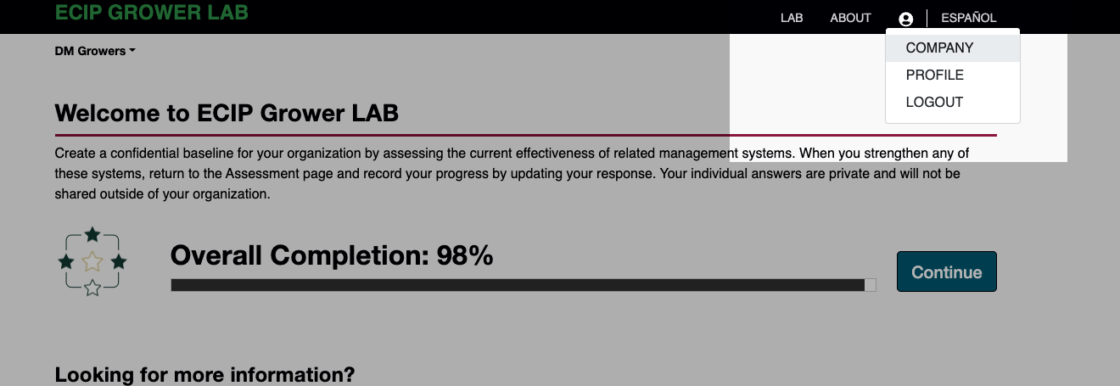
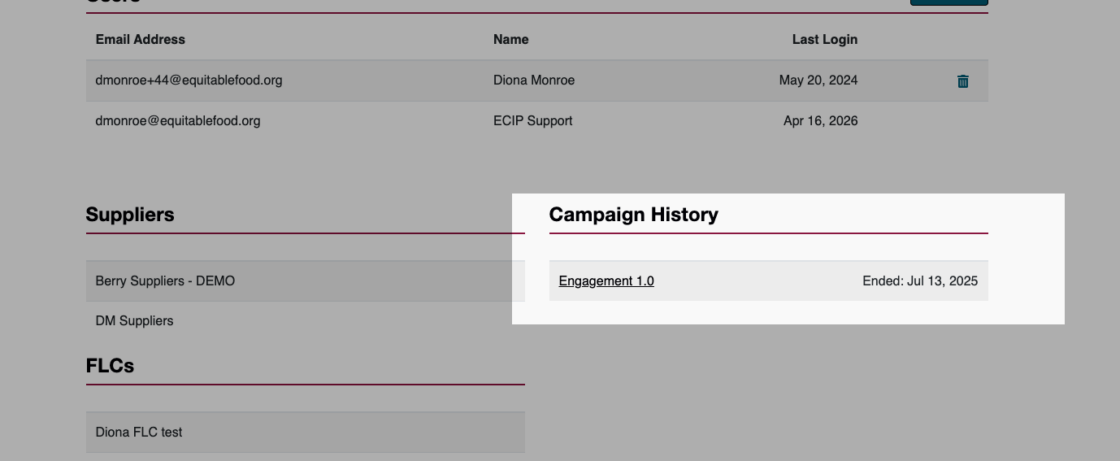
How to Access Your Prior Engagement Data

  1. Log in to ECIP LAB: Navigate to your homepage. This process is the same whether you are an FLC, Grower or Supplier.

  2. Access Company Settings: Click on the Person Icon in the top right corner of the screen and select Company from the dropdown menu.

    3. Find Your History: Scroll down to the bottom of the Company page to locate the Campaign History section.

    4. View Results: Click the hyperlink for the specific campaign you wish to review (e.g., Engagement 1.0).

What’s included in the report?
  • Assessment Completion: Your total progress percentage from that cycle.

  • Detailed Responses: A breakdown of how you answered specific questions within categories like Legal Compliance and Occupational Health & Safety.

  • Engagement Profile: A snapshot of your status during that specific cycle.

Skip to content